> ## Documentation Index
> Fetch the complete documentation index at: https://help.fanaura.com/llms.txt
> Use this file to discover all available pages before exploring further.
# Aura Chat Overview
> Meet Aura Chat, the agentic system that queries your real fan data, builds campaigns, creates flows, and executes work across Fanaura.
**Aura Chat** is Fanaura's agentic system. Unlike generic chatbots, Aura Chat has full access to your artist data: every fan, release, tour date, campaign metric, and merch product. Ask a question in plain English and get real answers backed by your real data.
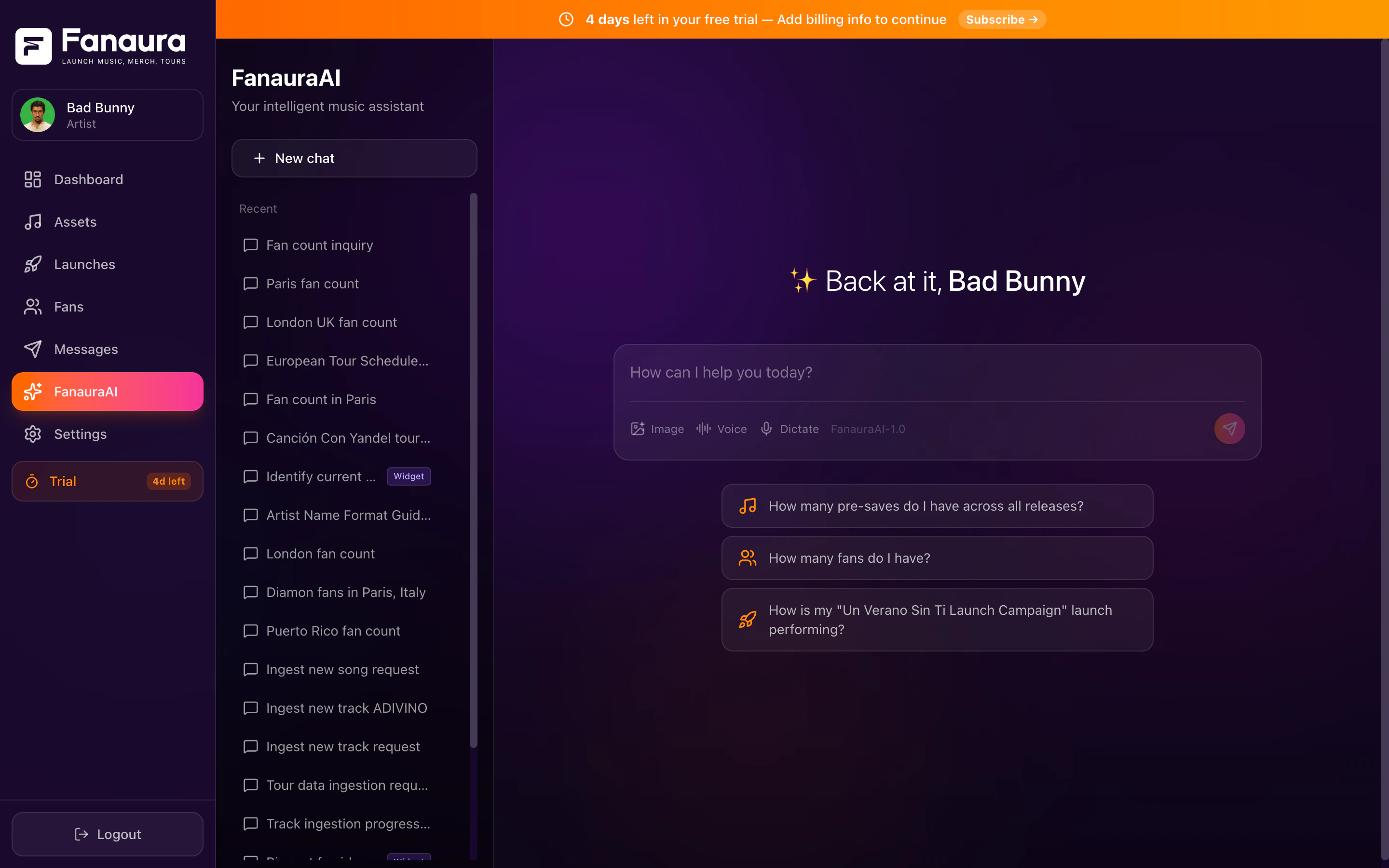 **Artist Basic** includes **Aura Advisor**. **Artist Pro** includes **Aura Manager** for goal-directed campaign execution. Open Aura Chat at `/chat` in the app (legacy `/ai` URLs redirect there).
***
## What Makes Aura Chat Different
Most AI assistants are general-purpose. They can summarize an article, but they do not know anything about your career.
Aura Chat queries your fan database, release catalog, and campaign history directly. When you ask "How many fans do I have in Texas?", it returns the exact number from your account. When you ask "How is my new single performing?", it pulls presave counts, conversion rates, and engagement data.
Fans, releases, tours, merch, campaigns, flows, and settings. Aura Chat sees all of it.
Query data, create assets, analyze metrics, find fans, build tours, and more through 113 integrated tools.
Live data from your account, not a stale export.
Aura Chat can create releases, build tours, update your profile, add fans to lists, and start flows.
***
## Aura Advisor vs Aura Manager
| Label | Plan | Role |
| - | - | - |
| **Aura Advisor** | Artist Basic (\$10/mo) | Strategist in your pocket: fan questions, release guidance, and data queries. |
| **Aura Manager** | Artist Pro (\$47/mo) | Release marketing that runs for you: multi-step campaigns across email, SMS, and Instagram DMs. |
Both labels refer to the same Aura Chat system. The plan determines how much autonomous campaign work is available.
***
## The Chat Interface
Aura Chat lives in the **Chat** section of your dashboard (`/chat`).
### Conversation area
Type your question in the input field and press Enter. Responses stream in real time and can include formatted tables, song cards, fan profiles, event cards, and map visualizations.
### Thinking steps
For complex questions, Aura Chat shows expandable thinking steps: which tools it is using, which data it is querying, and how it reaches an answer.
Toggle thinking display on or off in the chat settings. It helps you understand what Aura Chat is doing behind the scenes.
### Voice support
* **Speech-to-text**: click the microphone and speak your question.
* **Text-to-speech**: Aura Chat can read responses aloud for hands-free use.
***
## Sidebar: Conversation History
The left sidebar lists past conversations:
* **Search** by keyword
* **Rename** conversations for easy reference
* **Delete** conversations (recoverable for 30 days)
Each conversation keeps its own context, so you can run separate threads for tour planning, merch analysis, and fan growth in parallel.
***
## What You Can Do With Aura Chat
Get instant answers about any part of your Fanaura data:
* Fan counts, segments, and demographics
* Release performance and presave metrics
* Tour dates and RSVP numbers
* Campaign analytics and engagement stats
* Merch click tracking
* Flow completion rates
Aura Chat can do work on your behalf:
* Create a new music release (interactive music ingestion wizard)
* Build a tour from pasted routing data
* Update your artist profile and bio
* Add fans to lists
* Look up streaming metadata by ISRC
Ask for analysis and recommendations:
* "Compare my last two releases"
* "What are my top cities by fan count?"
* "Give me a summary of this month's engagement"
* "Which fans are most likely to buy merch?"
### Response cards
When Aura Chat returns specific data, it often presents rich cards:
Artwork, title, presave counts, platform links.
Name, VIP tier, location, engagement history.
Venue, date, city, RSVP count, ticket link.
Geographic visualization of fan locations.
***
## Chat Management
Click **New Chat** in the sidebar for a fresh thread.
Use the three-dot menu and select **Rename**.
Deleted conversations enter a 30-day recovery window before permanent removal.
Use the sidebar search bar to find past threads by keyword.
***
## Getting Started
Try these first questions:
1. **"How many fans do I have?"**
2. **"Show me my latest release"**
3. **"What are my top cities?"**
4. **"Help me create a new release"**
Queries and actions by category.
Paste routing data and let Aura Chat build your tour.
Create releases with the interactive wizard.
Get better results from Aura Chat.
***
## Privacy
Aura Chat only accesses data within your Fanaura account. Your conversations are private to your workspace. Aura Chat does not share your data with other artists.
This documentation is built and hosted on [Mintlify](https://mintlify.com), a developer documentation platform.
**Artist Basic** includes **Aura Advisor**. **Artist Pro** includes **Aura Manager** for goal-directed campaign execution. Open Aura Chat at `/chat` in the app (legacy `/ai` URLs redirect there).
***
## What Makes Aura Chat Different
Most AI assistants are general-purpose. They can summarize an article, but they do not know anything about your career.
Aura Chat queries your fan database, release catalog, and campaign history directly. When you ask "How many fans do I have in Texas?", it returns the exact number from your account. When you ask "How is my new single performing?", it pulls presave counts, conversion rates, and engagement data.
Fans, releases, tours, merch, campaigns, flows, and settings. Aura Chat sees all of it.
Query data, create assets, analyze metrics, find fans, build tours, and more through 113 integrated tools.
Live data from your account, not a stale export.
Aura Chat can create releases, build tours, update your profile, add fans to lists, and start flows.
***
## Aura Advisor vs Aura Manager
| Label | Plan | Role |
| - | - | - |
| **Aura Advisor** | Artist Basic (\$10/mo) | Strategist in your pocket: fan questions, release guidance, and data queries. |
| **Aura Manager** | Artist Pro (\$47/mo) | Release marketing that runs for you: multi-step campaigns across email, SMS, and Instagram DMs. |
Both labels refer to the same Aura Chat system. The plan determines how much autonomous campaign work is available.
***
## The Chat Interface
Aura Chat lives in the **Chat** section of your dashboard (`/chat`).
### Conversation area
Type your question in the input field and press Enter. Responses stream in real time and can include formatted tables, song cards, fan profiles, event cards, and map visualizations.
### Thinking steps
For complex questions, Aura Chat shows expandable thinking steps: which tools it is using, which data it is querying, and how it reaches an answer.
Toggle thinking display on or off in the chat settings. It helps you understand what Aura Chat is doing behind the scenes.
### Voice support
* **Speech-to-text**: click the microphone and speak your question.
* **Text-to-speech**: Aura Chat can read responses aloud for hands-free use.
***
## Sidebar: Conversation History
The left sidebar lists past conversations:
* **Search** by keyword
* **Rename** conversations for easy reference
* **Delete** conversations (recoverable for 30 days)
Each conversation keeps its own context, so you can run separate threads for tour planning, merch analysis, and fan growth in parallel.
***
## What You Can Do With Aura Chat
Get instant answers about any part of your Fanaura data:
* Fan counts, segments, and demographics
* Release performance and presave metrics
* Tour dates and RSVP numbers
* Campaign analytics and engagement stats
* Merch click tracking
* Flow completion rates
Aura Chat can do work on your behalf:
* Create a new music release (interactive music ingestion wizard)
* Build a tour from pasted routing data
* Update your artist profile and bio
* Add fans to lists
* Look up streaming metadata by ISRC
Ask for analysis and recommendations:
* "Compare my last two releases"
* "What are my top cities by fan count?"
* "Give me a summary of this month's engagement"
* "Which fans are most likely to buy merch?"
### Response cards
When Aura Chat returns specific data, it often presents rich cards:
Artwork, title, presave counts, platform links.
Name, VIP tier, location, engagement history.
Venue, date, city, RSVP count, ticket link.
Geographic visualization of fan locations.
***
## Chat Management
Click **New Chat** in the sidebar for a fresh thread.
Use the three-dot menu and select **Rename**.
Deleted conversations enter a 30-day recovery window before permanent removal.
Use the sidebar search bar to find past threads by keyword.
***
## Getting Started
Try these first questions:
1. **"How many fans do I have?"**
2. **"Show me my latest release"**
3. **"What are my top cities?"**
4. **"Help me create a new release"**
Queries and actions by category.
Paste routing data and let Aura Chat build your tour.
Create releases with the interactive wizard.
Get better results from Aura Chat.
***
## Privacy
Aura Chat only accesses data within your Fanaura account. Your conversations are private to your workspace. Aura Chat does not share your data with other artists.
This documentation is built and hosted on [Mintlify](https://mintlify.com), a developer documentation platform.