> ## Documentation Index
> Fetch the complete documentation index at: https://help.fanaura.com/llms.txt
> Use this file to discover all available pages before exploring further.
# Integrations Overview
> Connect Fanaura with third-party services to unlock SMS, Instagram DMs, native notification pre-saves, and more.
Fanaura becomes more powerful with every service you connect. Integrations let you automate Instagram DMs, send SMS campaigns through your own phone number, enable Spotify and Apple Music presaves, and much more. This page gives you a bird's-eye view of everything available and how to get started.
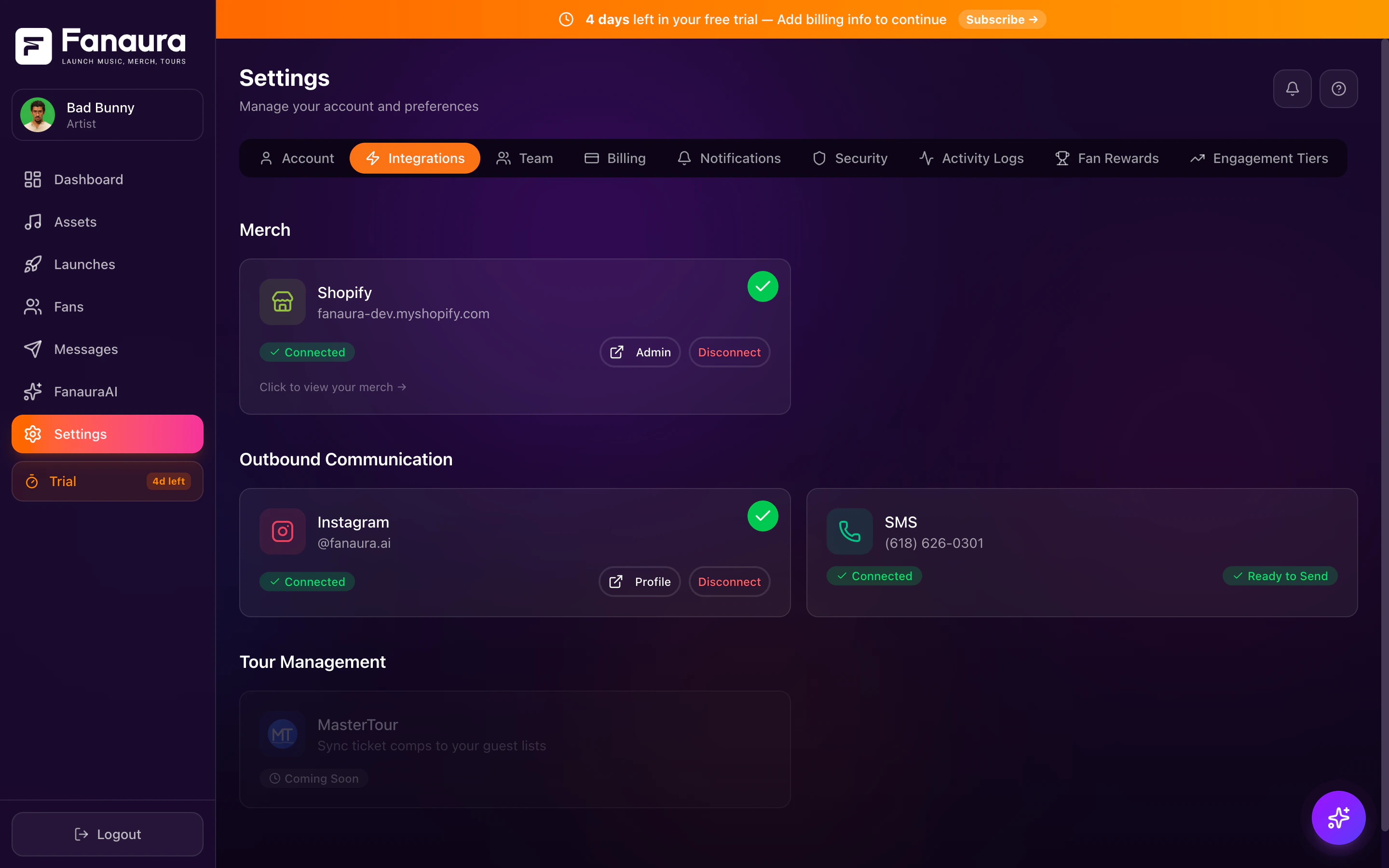 ## How to Access Integrations
You can reach the Integrations page two ways:
Click **Integrations** in the left sidebar navigation.
Click **Settings** (gear icon), then select the **Integrations** tab.
Both routes take you to the same page.
## Available Integrations
Provision a **local 10DLC** number for 2-way SMS, blasts, and flows. Throughput is batched per minute based on your line's configured rate and carrier rules.
Automate Instagram DMs, comment-to-DM triggers, story responses, and keyword-based flow automation.
Artist search and metadata lookup (read-only). Pre-saves use native notification, not Spotify OAuth.
Platform selection for native notification pre-save on release day.
All 9+ DSPs for presaves and streaming links including YouTube Music, Tidal, Deezer, and more.
Sync tour dates and booking data from MasterTour into Fanaura. Coming soon.
## Integration Categories
### Messaging
Connect communication channels to reach fans directly.
| Integration | What It Does | Status |
| - | - | - |
| **SMS** | Provision your own phone number for 2-way SMS with fans | Available |
| **Instagram** | Automate Instagram DMs, comment triggers, story responses | Available |
### Music
Connect streaming and music platforms for presaves and analytics.
| Integration | What It Does | Status |
| - | - | - |
| **Spotify** | Enable presaves, artist search, streaming metadata | Available |
| **Apple Music** | Enable presaves via MusicKit | Available |
| **9 Additional DSPs** | Streaming links for YouTube Music, Amazon Music, Tidal, Deezer, Pandora, SoundCloud, Audiomack | Available |
### Touring
Connect tour management platforms for booking and venue data.
| Integration | What It Does | Status |
| - | - | - |
| **MasterTour** | Sync tour dates and booking data | Coming Soon |
### Merch (no store API)
Merch is managed in **Assets > Merch** — add a title, image, and external **https** product link. Fanaura does not connect to e-commerce platforms via API. See [Adding Merch](/assets/merch/adding-merch).
## Integration Status Indicators
On the Integrations page, each service shows its current connection status:
* **Connected** (green): The integration is active and working.
* **Not Connected** (grey): The integration is available but not yet set up.
* **Coming Soon** (badge): The integration is planned but not yet available.
* **Error** (red): Something went wrong. Click to view details and troubleshoot.
## What Each Integration Unlocks
Connecting an integration opens new capabilities throughout Fanaura:
* Send SMS blasts to opted-in fans
* Add SMS actions to your flows
* 2-way fan conversations in the Fans page
* SMS campaign sending (batched per your number's messages-per-minute setting)
* Trigger flows when fans DM you specific keywords
* Auto-DM fans who comment on your posts, reels, or lives
* Respond to story mentions and replies
* Send Instagram DMs through flow actions
* Fans can presave your upcoming releases
* Artist metadata auto-fills during music ingestion
* Presave-to-stream conversion tracking
* Artwork and song data imported automatically
* Fans can presave on Apple Music alongside Spotify
* Songs are added to their library on release day
* Broadens your presave reach to Apple's audience
## Setup Process
Each integration has its own setup flow, but they generally follow the same pattern:
Go to the Integrations page.
Click the integration you want to connect.
Authorize via OAuth (for Instagram, Spotify) or follow the provisioning flow for SMS.
Adjust any settings specific to that integration.
Confirm the connection is active (green status).
Detailed setup guides for each integration are available in the pages linked above.
## Disconnecting Integrations
If you need to disconnect a service:
Go to the Integrations page.
Click on the connected integration.
Click **Disconnect** and confirm the action.
Before disconnecting, check if any active flows rely on that integration. Pause those flows first to avoid errors.
**What happens when you disconnect**:
* The integration stops syncing data.
* Existing data (fan interactions, etc.) is preserved in Fanaura.
* Flows using that integration's actions will not be able to send (those actions will error).
* You can reconnect at any time.
## Permissions and Access
Not all team members can manage integrations:
| Role | Can View | Can Connect/Disconnect |
| - | - | - |
| Account Owner | Yes | Yes |
| Admin | Yes | Yes |
| Manager | Yes | Yes |
| All other roles | No | No |
## Best Practices
**Connect integrations before your first launch.** The more integrations you have active, the more data Fanaura collects from every fan interaction.
**Start with your highest-priority channel.** If Instagram is where your fans engage most, connect Instagram first. If SMS is your primary communication channel, start with SMS provisioning.
**Test after connecting.** After each integration, run a quick test — send a test SMS or verify Instagram webhook delivery.
**Keep credentials secure.** API keys and tokens are stored securely in Fanaura, but never share them in public channels (Slack, email) or with people who do not need them.
This documentation is built and hosted on [Mintlify](https://mintlify.com), a developer documentation platform.
## How to Access Integrations
You can reach the Integrations page two ways:
Click **Integrations** in the left sidebar navigation.
Click **Settings** (gear icon), then select the **Integrations** tab.
Both routes take you to the same page.
## Available Integrations
Provision a **local 10DLC** number for 2-way SMS, blasts, and flows. Throughput is batched per minute based on your line's configured rate and carrier rules.
Automate Instagram DMs, comment-to-DM triggers, story responses, and keyword-based flow automation.
Artist search and metadata lookup (read-only). Pre-saves use native notification, not Spotify OAuth.
Platform selection for native notification pre-save on release day.
All 9+ DSPs for presaves and streaming links including YouTube Music, Tidal, Deezer, and more.
Sync tour dates and booking data from MasterTour into Fanaura. Coming soon.
## Integration Categories
### Messaging
Connect communication channels to reach fans directly.
| Integration | What It Does | Status |
| - | - | - |
| **SMS** | Provision your own phone number for 2-way SMS with fans | Available |
| **Instagram** | Automate Instagram DMs, comment triggers, story responses | Available |
### Music
Connect streaming and music platforms for presaves and analytics.
| Integration | What It Does | Status |
| - | - | - |
| **Spotify** | Enable presaves, artist search, streaming metadata | Available |
| **Apple Music** | Enable presaves via MusicKit | Available |
| **9 Additional DSPs** | Streaming links for YouTube Music, Amazon Music, Tidal, Deezer, Pandora, SoundCloud, Audiomack | Available |
### Touring
Connect tour management platforms for booking and venue data.
| Integration | What It Does | Status |
| - | - | - |
| **MasterTour** | Sync tour dates and booking data | Coming Soon |
### Merch (no store API)
Merch is managed in **Assets > Merch** — add a title, image, and external **https** product link. Fanaura does not connect to e-commerce platforms via API. See [Adding Merch](/assets/merch/adding-merch).
## Integration Status Indicators
On the Integrations page, each service shows its current connection status:
* **Connected** (green): The integration is active and working.
* **Not Connected** (grey): The integration is available but not yet set up.
* **Coming Soon** (badge): The integration is planned but not yet available.
* **Error** (red): Something went wrong. Click to view details and troubleshoot.
## What Each Integration Unlocks
Connecting an integration opens new capabilities throughout Fanaura:
* Send SMS blasts to opted-in fans
* Add SMS actions to your flows
* 2-way fan conversations in the Fans page
* SMS campaign sending (batched per your number's messages-per-minute setting)
* Trigger flows when fans DM you specific keywords
* Auto-DM fans who comment on your posts, reels, or lives
* Respond to story mentions and replies
* Send Instagram DMs through flow actions
* Fans can presave your upcoming releases
* Artist metadata auto-fills during music ingestion
* Presave-to-stream conversion tracking
* Artwork and song data imported automatically
* Fans can presave on Apple Music alongside Spotify
* Songs are added to their library on release day
* Broadens your presave reach to Apple's audience
## Setup Process
Each integration has its own setup flow, but they generally follow the same pattern:
Go to the Integrations page.
Click the integration you want to connect.
Authorize via OAuth (for Instagram, Spotify) or follow the provisioning flow for SMS.
Adjust any settings specific to that integration.
Confirm the connection is active (green status).
Detailed setup guides for each integration are available in the pages linked above.
## Disconnecting Integrations
If you need to disconnect a service:
Go to the Integrations page.
Click on the connected integration.
Click **Disconnect** and confirm the action.
Before disconnecting, check if any active flows rely on that integration. Pause those flows first to avoid errors.
**What happens when you disconnect**:
* The integration stops syncing data.
* Existing data (fan interactions, etc.) is preserved in Fanaura.
* Flows using that integration's actions will not be able to send (those actions will error).
* You can reconnect at any time.
## Permissions and Access
Not all team members can manage integrations:
| Role | Can View | Can Connect/Disconnect |
| - | - | - |
| Account Owner | Yes | Yes |
| Admin | Yes | Yes |
| Manager | Yes | Yes |
| All other roles | No | No |
## Best Practices
**Connect integrations before your first launch.** The more integrations you have active, the more data Fanaura collects from every fan interaction.
**Start with your highest-priority channel.** If Instagram is where your fans engage most, connect Instagram first. If SMS is your primary communication channel, start with SMS provisioning.
**Test after connecting.** After each integration, run a quick test — send a test SMS or verify Instagram webhook delivery.
**Keep credentials secure.** API keys and tokens are stored securely in Fanaura, but never share them in public channels (Slack, email) or with people who do not need them.
This documentation is built and hosted on [Mintlify](https://mintlify.com), a developer documentation platform.